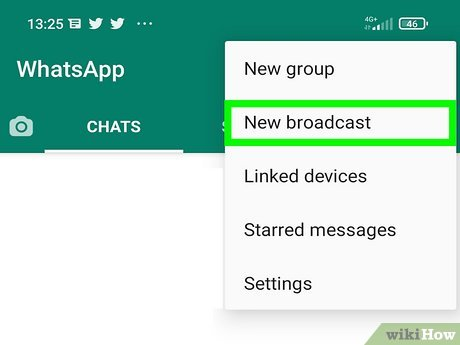
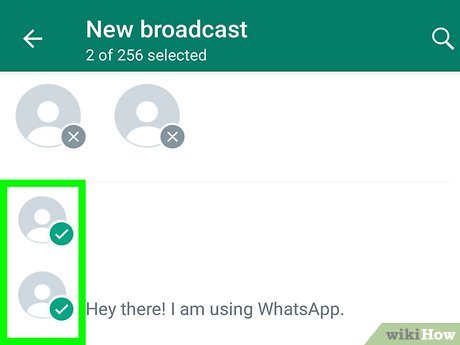
- By selecting the green tick button, you may create the broadcast list. That’s all.
Observing is simple. Look for double-blue ticks in front of the conversations you have sent the broadcast to. Now that your contacts have added you to their contact list, you may send and track WhatsApp Broadcast messages to them.
Of Sending WhatsApp Broadcast by Business App
Sharing broadcasts via WhatsApp Business is simple, but it may not be sufficient to keep your business afloat. Let’s examine several app constraints that can render it inappropriate for your company:
- WhatsApp only allows 256 contacts per broadcast.
- Available only on two different devices (one smartphone and one PC).
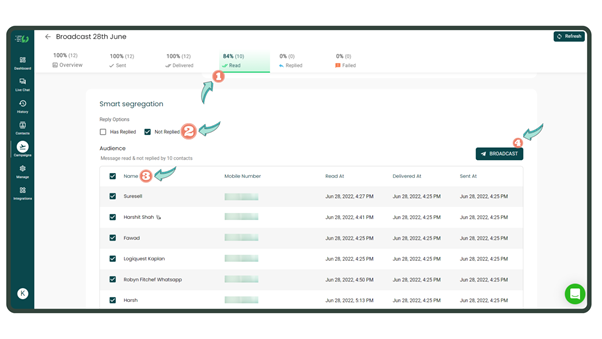
- No intelligent grouping and analysis of transmitted messages.
- There is no capability for WhatsApp chatbot integration, rapid responses, or conversation automation.
- The broadcast won’t reach anyone who hasn’t added you to their contact list.
WhatsApp Business is much more appropriate for individuals and small company owners wishing to build their identification as a Business. However, restricting 256 contacts for broadcasting broadcast messages alone might burden medium-sized and big enterprises.
Numbers are significant, especially if you wish to broadcast messages to a large audience on WhatsApp! You need a bigger, better platform to reach a larger audience. Send broadcast messages via WhatsApp to Unlimited subscribers.
But WHATSAPP BUSINESS API is a superior option. With WhatsApp Business API, you can engage with many customers at once, automate abandoned cart alerts and payment links, send broadcasts to up to 100,000 unique users, and offer live chat help and 24×7 customer care.
WhatsApp Broadcasting leveraging WhatsApp Business API
With the help of the WhatsApp Business API, organizations can quickly receive and respond to an infinite number of WhatsApp message. To offer medium and big businesses a customized solution for increasing their consumer interaction via WhatsApp, Facebook established itself in August 2018. Small companies all around Africa, Latin America, and South East Asia started abandoning email entirely in 2017–18 in favour of using their WhatsApp accounts as their primary means of client communication. These companies didn’t use WhatsApp initially, They used WhatsApp exclusively. So Facebook decided to provide WhatsApp for business at this time. Businesses have welcomed and used WhatsApp Business to communicate with their clients ever since the service launched, and why not.
There are several valid reasons why companies are abandoning all other platforms and switching to WhatsApp. First, because WhatsApp Business API is merely an interface, it requires a different CRM to interact with clients. This implies that companies need a dashboard from WhatsApp business providers like smsidea.biz to utilize all the functionality the WhatsApp API offers.
Let’s look at some of the benefits of using WhatsApp for business.
a. WhatsApp has become a preferred messaging medium because of how simple and convenient it is to use. We can only imagine how connecting through this platform has evolved into a daily habit, including over 1.1 million texts being exchanged every second.
b. WhatsApp messages have a far greater open rate than other messaging services like emails. As a result, businesses may bypass the competition and speak with clients directly by using WhatsApp.
c. By automating communications, companies may reply to client inquiries much more quickly. This may therefore result in an improvement in conversion rate and client satisfaction.
d. Companies may use WhatsApp to have exciting and entertaining chats. Emojis, stickers, and other rich text make it easy and appealing for users to communicate and remain connected.
WhatsApp is fundamentally a precise platform where user base already exists. Therefore, it is the simplest option for organizations to promote consumer interaction and offer customer care to clients. It guarantees quick and easy exchanges as well as superior customer service. Let’s examine how to obtain WhatsApp Business API for your company now that we know what it is and why organizations should use it.
Advantages of WhatsApp Marketing
1. Assists companies in strengthening relationships with their clients – The first thing businesses do when looking to expand their clientele is to build or forge a connection. One of the best uses of WhatsApp is for chats since it makes customers feel more integrated into the company. In addition, because it’s so easy to use, customers feel like they can contact brands or customer support anytime they want, making the process more accessible and quicker overall.
2. They increase conversion rates – Getting in touch with a prospective customer or lead is a sensitive and crucial process. Doing so via their favourite medium is a great move for businesses since it enables a more comfortable level of communication with the consumer or lead. In addition, being available to consumers at all times allows companies to demonstrate their caring for them while significantly raising customer conversion rates.
3. They help increase profitability – Due to the widespread usage of the platform, which exposes marketing teams to a big audience, businesses may grow their client base and enhance customer service. They speed up the ticket repair procedure and provide better access to customer care assistance, and increase conversion rates. Through their help, businesses may increase client retention rates, which boosts profitability.
4. It makes marketing more affordable – Conventional marketing techniques may be costly, practically burning a hole through your pocketbook. In addition, it might take a lot of time and money to use traditional marketing strategies like door-to-door flyer distribution or hand promotion of new products. Instead, using a WhatsApp marketing strategy will speed up and reduce the cost of the procedure but also increase conversion rates.
WhatsApp Broadcasting use cases
You may send WhatsApp broadcast messages through the API and WhatsApp Business app. Small companies with a few staff and clients frequently utilize the standard WhatsApp Business app. However, larger businesses might be better suited to using the WhatsApp Business API instead of the app due to a few restrictions that make it unsuitable. I’ve provided a few helpful examples below to give you a better sense of how you may use WhatsApp Business broadcasting:
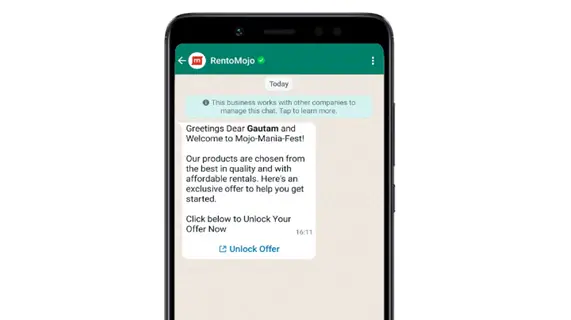
- Sending WhatsApp Newsletter: Share with your consumers who have opted in the most recent information about your business or items.
- Sending Notification: Send notifications to ticket holders for competitions about schedule changes, cancellations, or other news regarding games or matches.
- Status Update: Provide clients with status updates when your website is down due to problems or scheduled maintenance.
- Back-in-stock notices: Inform clients that the item they sought is once again available.
- Promotional updates: Send consumers information about gate changes, hotel check-in hours, or the colour of their tour guide’s attire when they arrive at the meeting location.
How to Send a WhatsApp Broadcast by Using an SMS Idea?
As I previously said, utilizing the WhatsApp Business app has some restrictions. The first restriction is that you may only send a broadcast message to contacts who have saved you on their phone while using the WhatsApp Business app. Additionally, you may only choose up to 256 contacts for your broadcast list. The program also only allows up to four users at a time and has few possibilities for automation. But, again, if you operate a small firm with just one or two people, this should be OK.
Immediately above your most recent discussion, in the conversations section of the WhatsApp Business program, you can see “Broadcast lists.” Therefore, a new broadcast list can be made here.
You may give the list a name and send your first message once you’ve added phone numbers to it. Following this, the list will be preserved so you may keep broadcasting messages to the same recipients.