How to send PDF from Tally to WhatsApp?

Blog

What is a WooCommerce SMS Plugin & WooCommerce Whatsapp Plugin and How Can It Enhance SMS & WhatsApp Integration?

 10/4/2023 12:18:11 PM
 

Have you heard about WooCommerce SMS PluginWell, it is an innovative and exciting tool designed to take your online business at new heights. It offers a wonderful, incredible, a seamless integration into Woo Commerce site.

The plugin empowers businesses to communicate with customers effectively. ? It enhances security and offers personalized updates.

All these help in enhancing user experience and provide better service to them. How and why can WooCommerce WhatsApp Plugin enhance SMS & WhatsApp Integration?

Improves security with OTP verification

The OTP or one-time password (OTP) feature ensures secure order processing. With the choice to enable OTP, you can protect the transactions from potential fraud while building customer trust.

Makes registration and login seamless

Another important benefit of these plugins is streamlining user onboarding with OTP verification for registration and login. Login security is one of the fundamental requirements nowadays.

The plugin makes the sign-up process for new users simple and provides a hassle-free, secure login 

Effortless password reset

It helps your customers regain access to their accounts swiftly using OTP verification for the password reset process. Users should not worry about the problem of forgotten passwords or account access issues.

Real-time Order Update

With the help of WooCommerce WhatsApp Plugin, you can keep your customers informed at every step of their purchase journey. This plugin can send SMS in real-time and also notify customers through WhatsApp for new order registration. Thus, you give them an engaging and smooth shopping experience.

Personalized Order Status Notifications

The amazing feature of custom SMS and WhatsApp templates helps you in tailoring the order status messages. You can notify customers with unique messages for various order statuses, e.g., On Hold, Pending, Completed, Cancelled, and so on. It is also another way of providing a delightful experience to the user.

Instant Customer-Seller Communication

The integration helps you in making direct communication with your buyers using SMS and WhatsApp order notes.

Let's start working together

To boost your revenue, request a proposal or contact us with your questions.

Our Branches

Bangalore office Address

42, Phase-2, Classic Orchards, Behind Meenakshi Temple, Bannergatta Main Road, Bangalore - Karnataka india Pin code - 560076

Mumbai office Address

Shop No 27/28, Gagan Shopping Arcade, Opp Meenakshi Tower, Gokuldham, Goregaon-East, Mumbai - Maharashtra india Pin code - 400063

Pune office Address

Office No 27, DNK Business Bay, Katraj, Pune - Maharashtra india Pin code - 411046

Delhi office Address

101, Pratap Nagar, Mayur Vihar Ph. 1, New Delhi, india Pin code - 110091

Surat office Address

Shop 2, 1st Floor, Karunasagar Society, Near Ankur School, Ambatalavdi, Katargam, Surat - Gujarat india Pin code - 395004

Vadodara office Address

306, Ananta Trendz, Opp. Prakruti Residency, Nr. Narayan Garden Gotri VUDA Road,Gorti Vadodara - Gujarat india Pin code - 390021

Rajkot office Address

FF/24-Shree mad bhavan 2nd floor, Opp kantastri vikas gruh school, Rajkot - Gujarat india Pin code - 360001


What are the requirements for WhatsApp API?

Blog

What are the requirements for WhatsApp API?

  3/13/2024 3:38:51 PM

WhatsApp Business API is an upgraded version of the existing WhatsApp Business App. Other than the security and reliability for businesses and customers that WhatsApp marketing brings, it also offers a spectrum of extra features, such as multiple logins, quick replies, chatbots, mass broadcasting, custom messages, and much more to support business sales in gaining more profit.

However, there are some requirements your business must meet in order to get authorization by WhatsApp API, and this blog aims to discuss those prerequisites in detail.

Requirements for WhatsApp Business API

There are several prerequisites you must meet to smoothly operate your business account on WhatsApp API. These are as follows:

Meta Business Account

A WhatsApp Business Account (WABA) allows your company to use the WhatsApp Business Portal to engage directly with its clients. WhatsApp uses a Business Account to verify the legitimacy of a brand for each account on the platform. If the account’s administration has completed Business Verification, the domain name of the business is displayed even if the user has not saved it to their address book. A Legitimate Business Account, on the contrary, displays a green check mark in its profile and conversation thread headings.

Business Website or App

You must create an app or website associated with your Meta Business Account, to provide all the necessary details about your business’ proceedings and related documentation.

User Access Token

API tokens are short snippets of code assembled to secure API access. API servers receive these diminutive strings, where the token acts as identification, verifying whether the user or the application has the credentials of the API.

Permissions

You will also need permissions that act as a form of granular, user-granted API authorization. Before the app can use endpoints to access any user’s data, the user must give your app all permissions mandated by the said endpoint.

Business Management

The WhatsApp business management license allows your app to read and manage WhatsApp business assets you own or have access to, by other companies. These assets include WhatsApp business account information, phone numbers, statement templates, QR codes, and webhook subscriptions

Business Messaging

The WhatsApp business messaging permission permits an app to transmit WhatsApp messages to a specified phone number, upload and recover media messages, operate the WhatsApp business profile data, and register the phone numbers with WhatsApp Meta.

Phone Number

A new phone number on which WhatsApp Business API will function is necessary. A new number implies that you have not registered it on any WhatsApp App at the given moment.

Conclusion

While the WhatsApp Business App supports small scale businesses with fundamental functions such as company profile integration, auto-replies, tags, and so on, the options are limited, particularly for those dealing with more clients and everyday inquiries. You need to fill out the application form on behalf of the company to get started with the registration process for WhatsApp Business API. The form includes basic details of the business and some specific entries related to the WhatsApp Business API. Once you’re verified by WhatsApp Marketing API, you’re all set!

Let's start working together

To boost your revenue, request a proposal or contact us with your questions.

Our Branches

Bangalore office Address

42, Phase-2, Classic Orchards, Behind Meenakshi Temple, Bannergatta Main Road, Bangalore - Karnataka india Pin code - 560076

Mumbai office Address

Shop No 27/28, Gagan Shopping Arcade, Opp Meenakshi Tower, Gokuldham, Goregaon-East, Mumbai - Maharashtra india Pin code - 400063

Pune office Address

Office No 27, DNK Business Bay, Katraj, Pune - Maharashtra india Pin code - 411046

Delhi office Address

101, Pratap Nagar, Mayur Vihar Ph. 1, New Delhi, india Pin code - 110091

Surat office Address

Shop 2, 1st Floor, Karunasagar Society, Near Ankur School, Ambatalavdi, Katargam, Surat - Gujarat india Pin code - 395004

Vadodara office Address

306, Ananta Trendz, Opp. Prakruti Residency, Nr. Narayan Garden Gotri VUDA Road,Gorti Vadodara - Gujarat india Pin code - 390021

Rajkot office Address

FF/24-Shree mad bhavan 2nd floor, Opp kantastri vikas gruh school, Rajkot - Gujarat india Pin code - 360001

How can I send invoice from Tally to WhatsApp?

Blog

How can I send invoice from Tally to WhatsApp?

  1/18/2024 11:54:03 AM

Tally WhatsApp Plugin is a useful plugin that can be used for sending invoices, ledger, and ledger confirmations. Reminders for outstanding, and so on at the click of a button. You need to update or enter the mobile number of your customer in the customer master of Tally, and it is possible to send WhatsApp messages simply from your Tally system.

Using the TDL add-on, you can now send important accounting vouchers, ledgers, reminders, and updates seamlessly from the Tally software to WhatsApp!

It is possible to send any reports, ledgers, and vouchers directly to the WhatsApp number of your customers as added in the party master in the Tally system.

When you use Tally SMS Plugin for sending invoices and orders, or outstanding reports to the customers directly from Tally to WhatsApp, you can speed up important business activities without any delay or dependency.

How to Send Invoices from Tally to WhatsApp?

It is a fast and effective way of sending billing information to your customers. You need to first install and activate the Tally to WhatsApp sender TDL in the Tally as per these steps. Once the Tally to WhatsApp module is activated, you can record the invoice or open the existing invoice. You can click on the Send WhatsApp Message button to send an Invoice to your customer’s WhatsApp instantly.

How to send confirmation of accounts from Tally to WhatsApp?

Sending confirmation of accounts from Tally on WhatsApp can be the quickest and most effective way of getting account confirmations from your customers and vendors.

First, install and activate Tally to WhatsApp sender TDL in your Tally. For that, you need to follow these steps.

Once you have activated the Tally to WhatsApp module, you can now navigate from Gateway of Tally to Display > Account books > Ledger > Press ALT+J: Send Confirmation on WhatsApp button and click on send now.

It is all done. Steps involved to send Messages from Tally to WhatsApp.

  • Download the Tally to WhatsApp TCP Paid Version.
  • Copy the downloaded TCP file in your TallyPrime folder
  • Open a Company in TallyPrime > Press F1: Help > TDLs & Add-ons > Press F4: Manage Local TDLs and select the TCP file to load
  • Press F6: add-on features and enable the Tally to WhatsApp module.
  • At the gateway of Tally, you will find a new option as “Tally to WhatsApp”
  • You should go to WhatsApp Settings and enter your unique WhatsApp API Instance ID, Access Token, and company shortcode

Update, the mobile number of your customers and suppliers with country code prefix.

These steps are done. You will now find a new button to send WhatsApp messages on all vouchers, outstanding reports, and ledgers.

The most amazing thing about this Tally to WhatsApp Sender TDL is you don’t need to keep your WhatsApp open. Also, you don’t need to scan your WhatsApp every time you send message.

It sends messages in the background via the official WhatsApp REST API route.

Use this wonderful Tally SMS Plugin and experience the power of WhatsApp to facilitate your business operations.

Let's start working together

To boost your revenue, request a proposal or contact us with your questions.

Our Branches

Bangalore office Address

42, Phase-2, Classic Orchards, Behind Meenakshi Temple, Bannergatta Main Road, Bangalore - Karnataka india Pin code - 560076

Mumbai office Address

Shop No 27/28, Gagan Shopping Arcade, Opp Meenakshi Tower, Gokuldham, Goregaon-East, Mumbai - Maharashtra india Pin code - 400063

Pune office Address

Office No 27, DNK Business Bay, Katraj, Pune - Maharashtra india Pin code - 411046

Delhi office Address

101, Pratap Nagar, Mayur Vihar Ph. 1, New Delhi, india Pin code - 110091

Surat office Address

Shop 2, 1st Floor, Karunasagar Society, Near Ankur School, Ambatalavdi, Katargam, Surat - Gujarat india Pin code - 395004

Vadodara office Address

306, Ananta Trendz, Opp. Prakruti Residency, Nr. Narayan Garden Gotri VUDA Road,Gorti Vadodara - Gujarat india Pin code - 390021

Rajkot office Address

FF/24-Shree mad bhavan 2nd floor, Opp kantastri vikas gruh school, Rajkot - Gujarat india Pin code - 360001

What are the limitations of WhatsApp Business API?

Blog

What Are the Benefits of Utilizing a WooCommerce Plugin for SMS & WhatsApp Communication?

 9/19/2023 6:35:44 PM

WhatsApp Business API has revolutionized the way companies interact with their customers, it is a platform that offers bespoke and secure messaging. Nevertheless, the technology also has its shortcomings and businesses need to consider these in order to fully exploit the technology capabilities. The analysis that follows is a comprehensive examination of the rules, thus making sure that each of the specified terms is used only once for uniformity and expediency.

Messaging Policies and User Consent

The WhatsApp Business API differs radically from the traditional bulk SMS methods as it places strict restrictions on messaging. The platform prides itself on user privacy and experience, not tolerating spam or unsolicited messages. By adopting this approach, businesses can ensure that the communications are relevant and welcomed, but this method may be paradoxical for companies used to wide-spread marketing strategies. The firms need to strategize to win user permissions, limiting the scope but enhancing the quality of interaction.

Media Sharing Limitations

Although the API allows different types of media, like photos, videos, and files, it has specific rules regarding the size and format. This can be a barrier for companies that use, visually appealing content to reach out to the audience. Meeting these regulations may require some innovative thinking and elaborate planning to remain within the bounds set by the API but without losing the intended impact of the messages

Group Chat Functionality

Group chats are a very flexible tool that businesses use to interact with many customers simultaneously, while also creating a feeling of community, and provide a single source for support. Nevertheless, because of the hindrance created by the API in initiating group chats, businesses may not be able to leverage the chat functionality to its full extent. Through this mechanism, businesses transfer the responsibility of creating such groups to customers. This situation may reduce the spontaneity of business-led conversation and thereby reduce the effectiveness of such interactions.

Integration with Business Systems

Integration of the WhatsApp Business API into existing business systems like the tally WhatsApp plugin, has the additional benefits of efficiency and data management. While it can be challenging to achieve this level of integration, it needs technical know-how and can be pretty many adjustments to both the API and business systems. The complexity of this aspect may put off smaller businesses and the ones with the limited IT resources from some of the benefits of the API, despite the fact that this API can help simplify and enhance the efficiency of the operation and the customer support.

Cost Considerations

The pricing approach of WhatsApp Business API is not similar to the services that provide bulk WhatsApp SMS. However, it is performed by the number of conversations initiated that can be considerably different and creates the difficulties for organizations totaling their messaging cost. This pricing model is thus demanding planning and budgeting, especially for organizations with multiple customer touch-points.

Conclusion

WhatsApp Business API is a useful tool that enables businesses to communicate with customers in a personalized and secure way. But it is because of its restrictions that businesses will need to have their planning and strategy right in order to get the best out of this platform. By taking into consideration these constraints, such as messaging guidelines and integration difficulties, companies can leverage the API successfully to enhance customer engagement and deliver great services in the digital age.

Let's start working together

To boost your revenue, request a proposal or contact us with your questions.

Our Branches

Bangalore office Address

42, Phase-2, Classic Orchards, Behind Meenakshi Temple, Bannergatta Main Road, Bangalore - Karnataka india Pin code - 560076

Mumbai office Address

Shop No 27/28, Gagan Shopping Arcade, Opp Meenakshi Tower, Gokuldham, Goregaon-East, Mumbai - Maharashtra india Pin code - 400063

Pune office Address

Office No 27, DNK Business Bay, Katraj, Pune - Maharashtra india Pin code - 411046

Delhi office Address

101, Pratap Nagar, Mayur Vihar Ph. 1, New Delhi, india Pin code - 110091

Surat office Address

Shop 2, 1st Floor, Karunasagar Society, Near Ankur School, Ambatalavdi, Katargam, Surat - Gujarat india Pin code - 395004

Vadodara office Address

306, Ananta Trendz, Opp. Prakruti Residency, Nr. Narayan Garden Gotri VUDA Road,Gorti Vadodara - Gujarat india Pin code - 390021

Rajkot office Address

FF/24-Shree mad bhavan 2nd floor, Opp kantastri vikas gruh school, Rajkot - Gujarat india Pin code - 360001

How to Add Jalpi Web Widget in Shopify Store

Blog

How to send PDF from Tally to WhatsApp?

 2/15/2024 6:44:21 PM
 

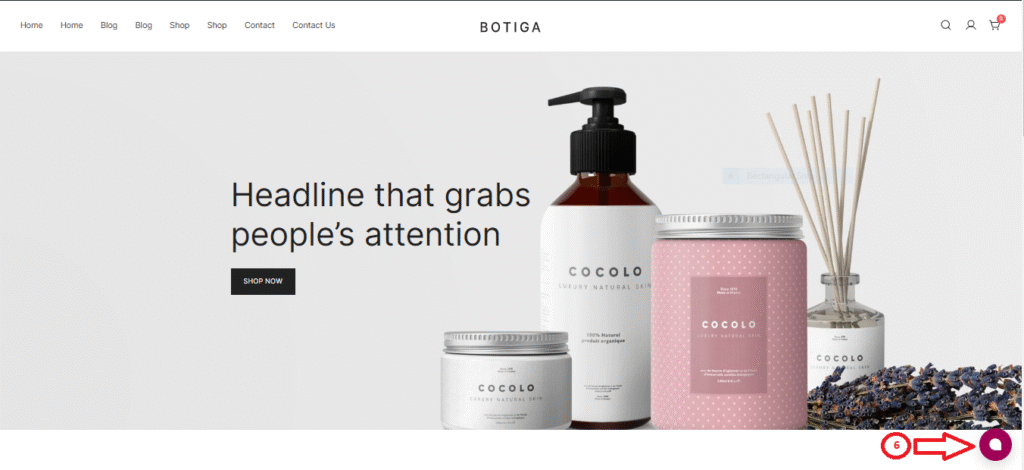
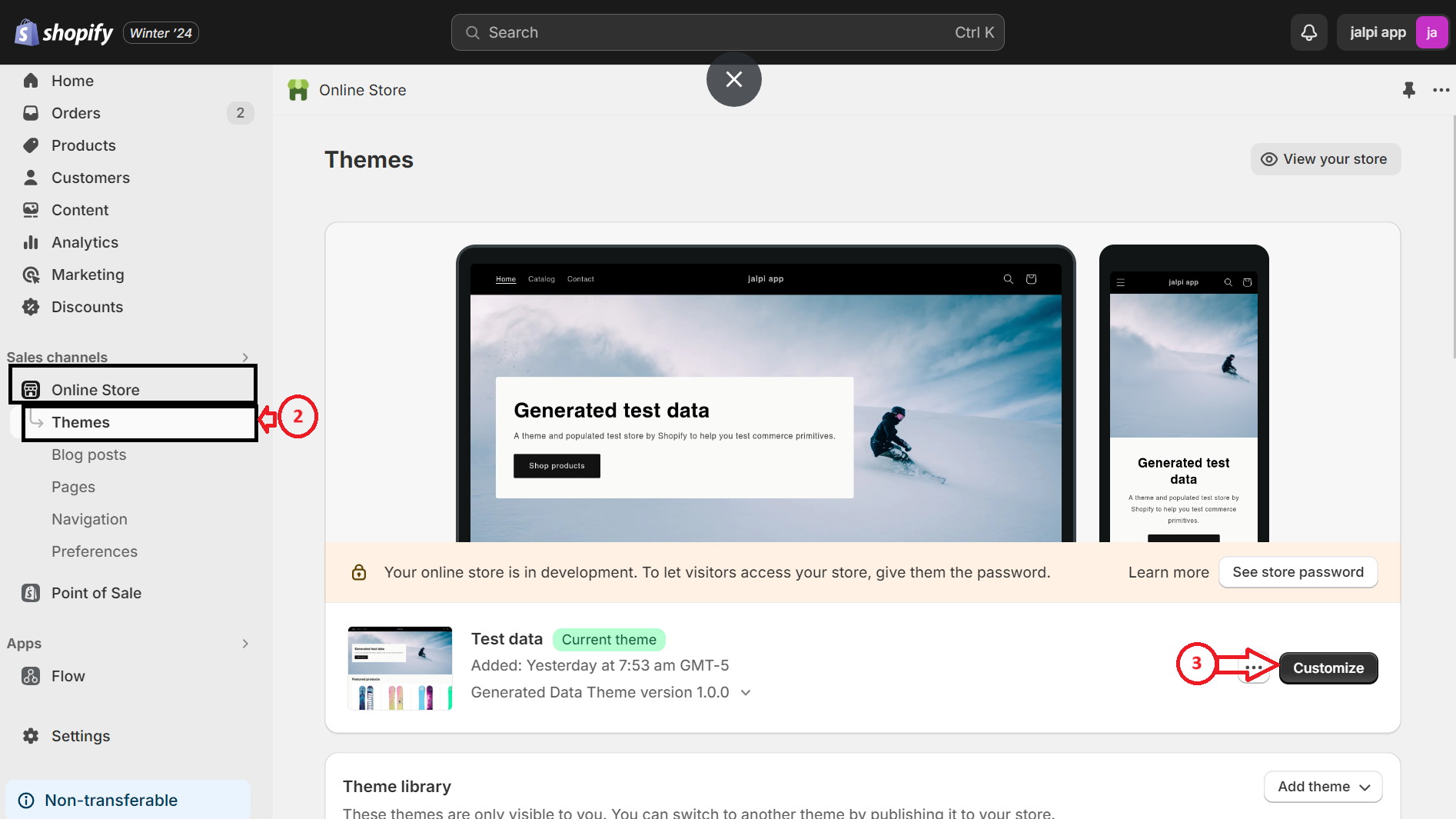
To implement the Jalpi Web Widget onto your Shopify store, you’ll need to follow a set of procedures. Here’s a step-by-step guide:

Step 1: Visit your Shopify admin interface.

Step 2: Navigate to Online Store > Themes section.

Step 3: Select the “Customize” option found on the right-hand side of the screen

Step 4: In the upper left corner, identify the option marked with ‘…’ and click on it to display a list of choices. Choose ‘Edit code.’

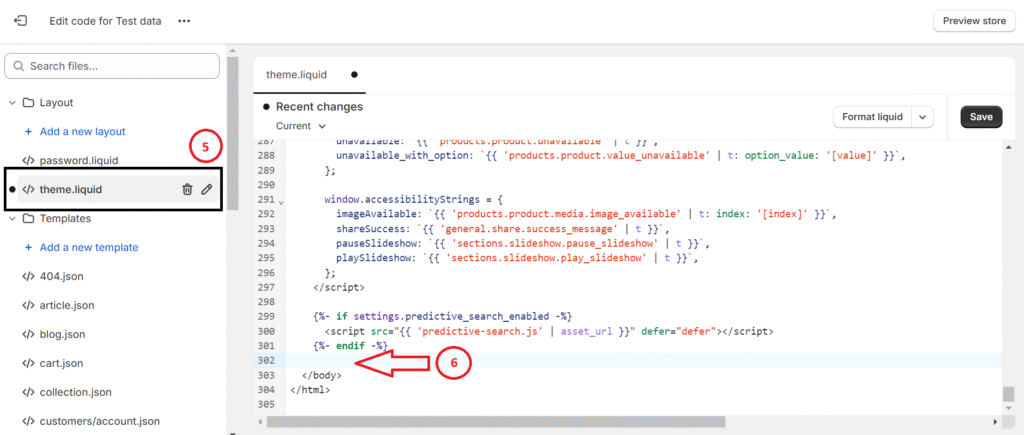
Step 5: Find and select ‘theme. Liquid’ within the ‘Layout’ folder. This will generate a code file on the right-hand side of the screen.

Step 6: Within the code on the right-hand side, place your JavaScript code just before the closing ” tag.

 Instructions for obtaining the Web Widget JavaScript code from the Jalpi website:

Step 7: Finalize your edits by saving them, then reload your site to view the updates

By adhering to these instructions, you’ll effectively incorporate the Jalpi Web Widget into your Shopify store, enriching user interaction and facilitating a smooth communication interface.

Let's start working together

To boost your revenue, request a proposal or contact us with your questions.

Our Branches

Bangalore office Address

42, Phase-2, Classic Orchards, Behind Meenakshi Temple, Bannergatta Main Road, Bangalore - Karnataka india Pin code - 560076

Mumbai office Address

Shop No 27/28, Gagan Shopping Arcade, Opp Meenakshi Tower, Gokuldham, Goregaon-East, Mumbai - Maharashtra india Pin code - 400063

Pune office Address

Office No 27, DNK Business Bay, Katraj, Pune - Maharashtra india Pin code - 411046

Delhi office Address

101, Pratap Nagar, Mayur Vihar Ph. 1, New Delhi, india Pin code - 110091

Surat office Address

Shop 2, 1st Floor, Karunasagar Society, Near Ankur School, Ambatalavdi, Katargam, Surat - Gujarat india Pin code - 395004

Vadodara office Address

306, Ananta Trendz, Opp. Prakruti Residency, Nr. Narayan Garden Gotri VUDA Road,Gorti Vadodara - Gujarat india Pin code - 390021

Rajkot office Address

FF/24-Shree mad bhavan 2nd floor, Opp kantastri vikas gruh school, Rajkot - Gujarat india Pin code - 360001

How to Supercharge Your Tally Experience with WhatsApp: A Step-by-Step Guide?

Blog

How to Supercharge Your Tally Experience with WhatsApp: A Step-by-Step Guide?

  1/2/2024 3:48:49 PM
 

Businesses are working in a highly competitive market where it is essential to maintain seamless communication. If you are a Tally user, then it is a software that understands the need for seamless integration with social media platforms like WhatsApp.

It is a great combination that has the power of empowering businesses by providing quick, effective, and efficient communication. Tally Whatsapp Plugin is a useful tool.

How can you supercharge your business by exploring and using various features and advantages of this integration? Here is a step-by-step guide.

Share ledgers reports

When you integrate Tally and WhatsApp, you can share ledger reports and reminder letters also.

It means you can manage and share these documents efficiently. You can communicate with multiple customers simultaneously.

Thus, as a business owner, you save a lot of time and effort. You ensure that communication remains swift and efficient. Whether the business is small-scale or large-scale, this integration helps a lot

It supports multiple document formats

Tally and WhatsApp combination gives immense flexibility for document sharing because it supports a full range of document formats. It can be pdf, jpeg, Excel, or anything. Tally is adaptable to meet their needs.

It can facilitate payment collection

Integration of Tally and WhatsApp can go the extra mile by facilitating payment collection. It is possible to share invoices that have a QR code and payment link with a ‘Pay Now’ option. This option can be embedded in the message.

This seamless payment option makes the process easy and simple not only for the business but for the owner as well.

It reduces the payment collection process.

Make use of a dedicated inbox facility

TallyPrime and WhatsApp combination offer a dedicated WhatsApp portal or Inbox. This is the platform where you can view and manage all incoming messages from customers. It helps businesses to track the replies of their customers. They can send a suitable reply to the client and customer and respond to them suitably.

Tally and WhatsApp offer data security

Data security is a big concern in today’s digital landscape. Tally and WhatsApp ensure that the communication is instant and secure.

Conclusion

Since staying connected is crucial in the competitive business world, it is crucial to use platforms that are safe and secure.

Tally with WhatsApp opens new avenues for instant and secure communication. Thus, you can always be in touch with your clients, always.

From flexible document formats to fast sharing of documents and to easy rectification of errors and enhanced security, the integration of WhatsApp and Tally can be a game-changer.

Use the combination of Tally and WhatsApp so that your business soars to new heights.

Let's start working together

To boost your revenue, request a proposal or contact us with your questions.

Our Branches

Bangalore office Address

42, Phase-2, Classic Orchards, Behind Meenakshi Temple, Bannergatta Main Road, Bangalore - Karnataka india Pin code - 560076

Mumbai office Address

Shop No 27/28, Gagan Shopping Arcade, Opp Meenakshi Tower, Gokuldham, Goregaon-East, Mumbai - Maharashtra india Pin code - 400063

Pune office Address

Office No 27, DNK Business Bay, Katraj, Pune - Maharashtra india Pin code - 411046

Delhi office Address

101, Pratap Nagar, Mayur Vihar Ph. 1, New Delhi, india Pin code - 110091

Surat office Address

Shop 2, 1st Floor, Karunasagar Society, Near Ankur School, Ambatalavdi, Katargam, Surat - Gujarat india Pin code - 395004

Vadodara office Address

306, Ananta Trendz, Opp. Prakruti Residency, Nr. Narayan Garden Gotri VUDA Road,Gorti Vadodara - Gujarat india Pin code - 390021

Rajkot office Address

FF/24-Shree mad bhavan 2nd floor, Opp kantastri vikas gruh school, Rajkot - Gujarat india Pin code - 360001

How to Add Jalpi Web Widget in WordPress Site

Blog

How to Add Jalpi Web Widget in WordPress Site

 2/20/2024 1:01:14 PM

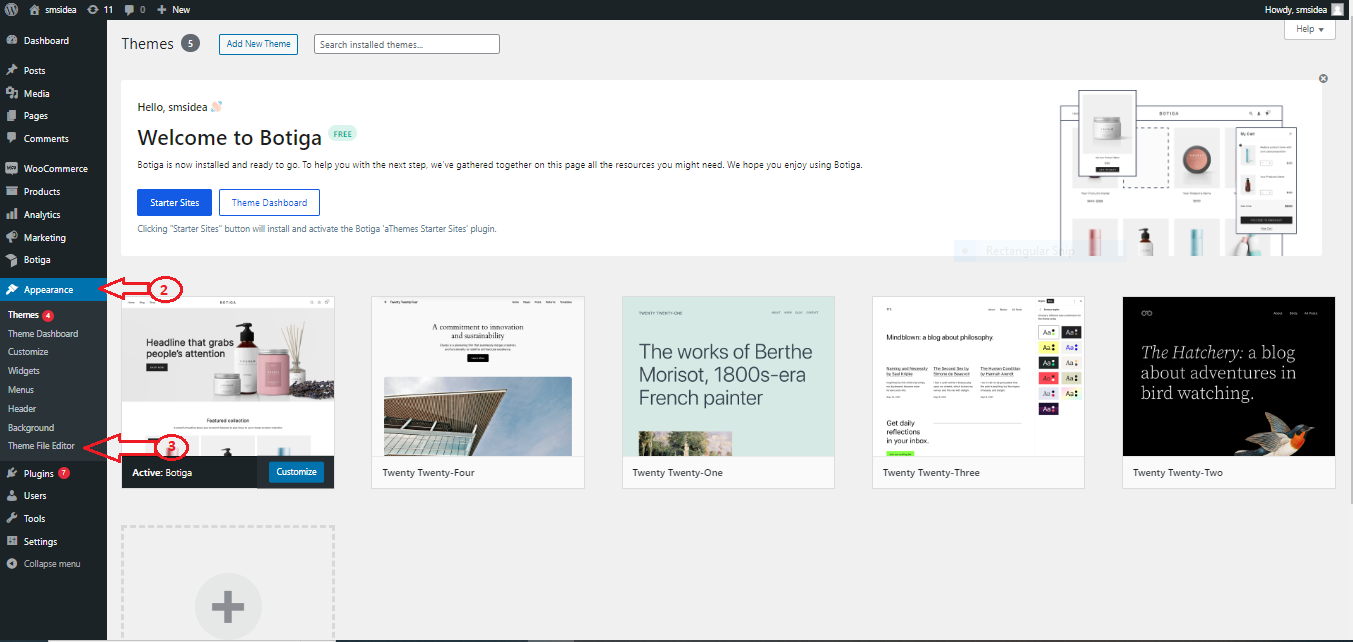
Certain steps are required to incorporate the Jalpi Web Widget into your WordPress site. Follow these guidelines to proceed:

Step 1: Go to your WordPress administrator site.

Step 2: Access the “Appearance” section.

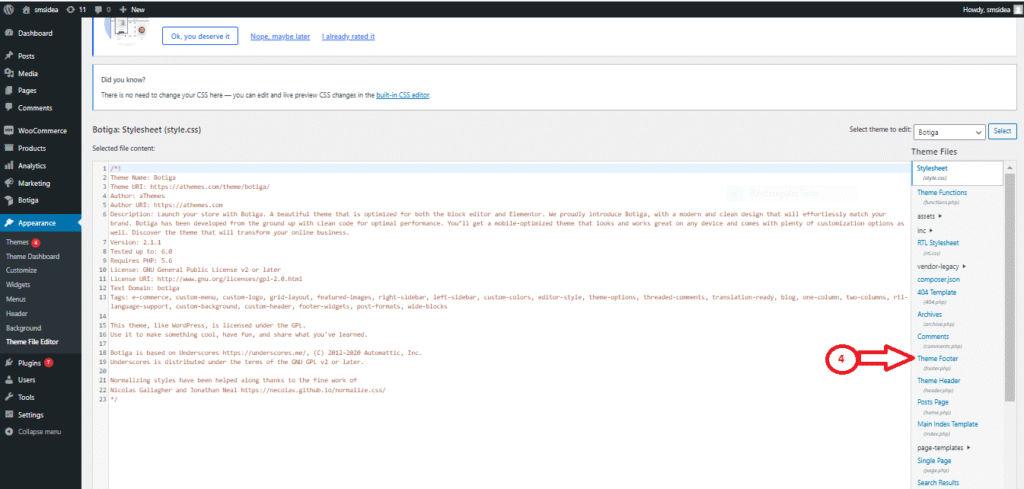
Step 3: Select the “Theme File Editor” option from the menu on the left-hand side of the screen.

Step 4: On the right-hand side, locate and click on the “Theme Footer” option.

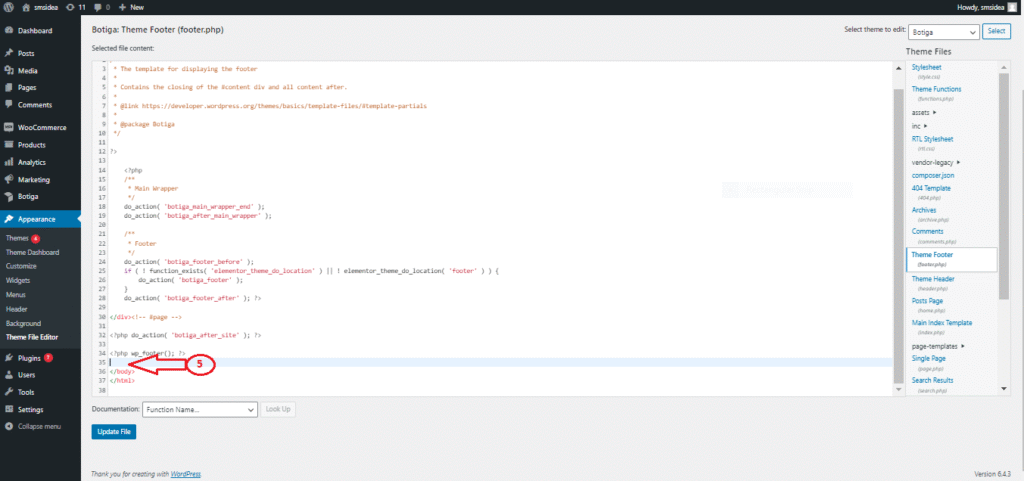
Step 5: Within the code on the right side, place your JavaScript code directly preceding the “</body>” section. Retrieve the Web Widget JavaScript code from the Jalpi website by following the steps outlined below:

  • Sign up at jalpi.com if you haven’t registered yet.
  • Go to the “Channels” section in the left-side menu.
  • Create a new channel by clicking on “Add Channel” and choose “WebChat.”
  • Enter the necessary details and copy the script tag from the Configuration tab. Paste this JavaScript code into the body of your WordPress layout, following the instructions provided in Step 5.

Step 6: Save your modifications to the file and refresh your site to view the updates.

Let's start working together

To boost your revenue, request a proposal or contact us with your questions.

Our Branches

Bangalore office Address

42, Phase-2, Classic Orchards, Behind Meenakshi Temple, Bannergatta Main Road, Bangalore - Karnataka india Pin code - 560076

Mumbai office Address

Shop No 27/28, Gagan Shopping Arcade, Opp Meenakshi Tower, Gokuldham, Goregaon-East, Mumbai - Maharashtra india Pin code - 400063

Pune office Address

Office No 27, DNK Business Bay, Katraj, Pune - Maharashtra india Pin code - 411046

Delhi office Address

101, Pratap Nagar, Mayur Vihar Ph. 1, New Delhi, india Pin code - 110091

Surat office Address

Shop 2, 1st Floor, Karunasagar Society, Near Ankur School, Ambatalavdi, Katargam, Surat - Gujarat india Pin code - 395004

Vadodara office Address

306, Ananta Trendz, Opp. Prakruti Residency, Nr. Narayan Garden Gotri VUDA Road,Gorti Vadodara - Gujarat india Pin code - 390021

Rajkot office Address

FF/24-Shree mad bhavan 2nd floor, Opp kantastri vikas gruh school, Rajkot - Gujarat india Pin code - 360001
What to Consider When Choosing a WooCommerce SMS Plugin & WooCommerce Whatsapp Plugin

Blog

What to Consider When Choosing a WooCommerce SMS Plugin & WooCommerce Whatsapp Plugin

10/4/2023 5:37:38 PM

Today, every business wants to remain connected with its customers and clients. Among various ways of connecting them is sending SMS notifications.

Technology can help a lot in doing that. If you compare different methods, WooCommerce SMS Plugin is a prominent one.

This plugin is very useful and convenient. The main advantage of sending SMS notifications through WooCommerce is that customers need not log in to it.

Store admin will let the customers know every update through SMS. They will get everything they need to know about the order on their mobile phone.

Nowadays, the majority of people want to receive notifications through SMS. So, today customer experience gets improved when they use WooCommerce WhatsApp Plugin.

But when you consider the WooCommerce SMS Plugin, what features will you consider? Here are some examples.

Check its technicalities

If you prefer using an official SMS plugin for whatever reason, you should pick one that integrates with multiple gateways. WooCommerce WhatsApp Plugin can not only integrate with WhatsApp but other software as well. Not just that, it is equally important to have a plugin that can be configured with minimal setup and there is no clutter.

To prevent spam and protect your store from fake phone numbers, this plugin is available with a phone number validation feature.

By using this feature, the store owner can eliminate maximum spam phone numbers from the directory. From the checkout page of this plugin, customers can choose whether they want to get the SMS notification or not.

Personalization of SMS is also another important aspect that you should be watchful of. It can be a very helpful feature if one wants to add custom details and personalize it with a brand name.

Another helpful feature, the WooCommerce SMS Plugin has is the Do Not Disturb mode. Yes, it is a very useful feature. One can select a timeframe to send messages out.

In the modern era of globalization, it is important to have the multilingual interface. This option will be handy if you have customers spread across different countries. It will help brand owners to get more clients and get higher revenue.

Also, the SMS plugin should not put any restriction on the number of words or characters in the message.  Though messages are normally short, you do not want any restriction on message length.

So, following features play an important role:

  • Integration with various gateways
  • Custom opt-in box for SMS notifications
  • Validation of Customer phone number
  • Automation of order status SMS notifications
  • Personalization of messages
  • Pricing
  • Technical and customer support

SMS for WooCommerce is a premium WordPress plugin. One can buy it from the official WooCommerce website.

The tool one uses should be able to use sitewide and not just for WooCommerce. Choose a tool that is an excellent addition to membership sites, regular blogs, and so on.

Choosing a plugin that can handle both WhatsApp and SMS will not be difficult if you check these features. Pick a plugin carefully and reap many advantages of this technique enhancement.

Let's start working together

To boost your revenue, request a proposal or contact us with your questions.

Our Branches

Bangalore office Address

42, Phase-2, Classic Orchards, Behind Meenakshi Temple, Bannergatta Main Road, Bangalore - Karnataka india Pin code - 560076

Mumbai office Address

Shop No 27/28, Gagan Shopping Arcade, Opp Meenakshi Tower, Gokuldham, Goregaon-East, Mumbai - Maharashtra india Pin code - 400063

Pune office Address

Office No 27, DNK Business Bay, Katraj, Pune - Maharashtra india Pin code - 411046

Delhi office Address

101, Pratap Nagar, Mayur Vihar Ph. 1, New Delhi, india Pin code - 110091

Surat office Address

Shop 2, 1st Floor, Karunasagar Society, Near Ankur School, Ambatalavdi, Katargam, Surat - Gujarat india Pin code - 395004

Vadodara office Address

306, Ananta Trendz, Opp. Prakruti Residency, Nr. Narayan Garden Gotri VUDA Road,Gorti Vadodara - Gujarat india Pin code - 390021

Rajkot office Address

FF/24-Shree mad bhavan 2nd floor, Opp kantastri vikas gruh school, Rajkot - Gujarat india Pin code - 360001

What Are the Benefits of Utilizing a WooCommerce Plugin for SMS & WhatsApp Communication

Blog

What Are the Benefits of Utilizing a WooCommerce Plugin for SMS & WhatsApp Communication?

 9/19/2023 6:35:44 PM

Can you ignore the importance of WhatsApp in our lives? Well, a platform that has more than 2 billion active users every month, nobody can do that. And you can easily imagine its untapped potential.

Now you can get answers to the questions asked in the caption of this blog easily. Yes, by integrating  WooCommerce website with WhatsApp  using WooCommerce SMS Plugin, you can tap the maximum potential.

With WhatsApp’s instant messaging feature, customers can get answers to their queries and doubts instantly, in real-time and get back to doing whatever they want.

But the benefits of this integration are not limited to this.

WhatsApp WooCommerce offers a boost to sales and conversions. It enhances personalized customer experiences and also streamlines support and query resolution process.

When the benefits are so lucrative, who will not want them?

So, get ready to learn how to take your support game to one level up with WhatsApp WooCommerce integration.

WhatsApp WooCommerce Integration, what is it?

For a layman, it is just a link on WooCommerce store with WhatsApp using WooCommerce WhatsApp Plugin.

Thus, you will be able to provide your customers an instant messaging assistance on their preferred app integrating your store with WhatsApp. 

As far as business benefits are concerned, they are many. You get higher customer satisfaction and customer loyalty. It can help in promoting business expansion.

Experts say that this integration opens new avenues to unparalleled customer engagement. Business owners can streamline their operations, and they can amplify sales potential.

Benefits of WooCommerce SMS Plugin

  • Improved Communication: Every customer wants convenience. When you use WooCommerce WhatsApp Pluginyou offer incredible convenience to them. Customers can quickly and easily contact your customer staff. Studies say that clients are more likely to choose your WooCommerce business over rivals because the average response time of WhatsApp is less than 15 minutes.
  • Multimedia messages: WhatsApp allows users to send multimedia messages like photographs and videos.
  • Faster problem resolution: WhatsApp facilitates the diagnosis and resolution of customer issues by your support staff. Customers have a smooth client experience.  
  • Personalized Customer Experience: Studies say that 80 percent of customers come back to the business if they get personalized customer experience.  WhatsApp is your gateway to a personalized experience. When you send personalized messages, you can improve customer loyalty. It is crucial for your WooCommerce store’s success.
  • Increased sales and business conversions: When you integrate WhatsApp, it is possible for you to send your customers alerts about new products, discounts, and deals. In business, the bottom line matters most. And when you increase sales and convert more customers, the bottom line gets strengthened.
  • Streamlined customer query resolution: Your customers will always have some queries, issues, and concerns. Your traditional support channel will be insufficient to serve them satisfactorily. Real-time resolution to their problems is not possible. This is where  WooCommerce WhatsApp Plugin comes in handy. It  greatly reduces the time it takes to resolve customer issues.

Hope you have understood the great benefits of WhatsApp WooCommerce integration.

Let's start working together

To boost your revenue, request a proposal or contact us with your questions.

Our Branches

Bangalore office Address

42, Phase-2, Classic Orchards, Behind Meenakshi Temple, Bannergatta Main Road, Bangalore - Karnataka india Pin code - 560076

Mumbai office Address

Shop No 27/28, Gagan Shopping Arcade, Opp Meenakshi Tower, Gokuldham, Goregaon-East, Mumbai - Maharashtra india Pin code - 400063

Pune office Address

Office No 27, DNK Business Bay, Katraj, Pune - Maharashtra india Pin code - 411046

Delhi office Address

101, Pratap Nagar, Mayur Vihar Ph. 1, New Delhi, india Pin code - 110091

Surat office Address

Shop 2, 1st Floor, Karunasagar Society, Near Ankur School, Ambatalavdi, Katargam, Surat - Gujarat india Pin code - 395004

Vadodara office Address

306, Ananta Trendz, Opp. Prakruti Residency, Nr. Narayan Garden Gotri VUDA Road,Gorti Vadodara - Gujarat india Pin code - 390021

Rajkot office Address

FF/24-Shree mad bhavan 2nd floor, Opp kantastri vikas gruh school, Rajkot - Gujarat india Pin code - 360001
Enhance Your Woo Commerce Store with Our SMS & WhatsApp Plugin! Boost Sales and Improve User Experience

Blog

Enhance Your Woo Commerce Store with Our SMS & WhatsApp Plugin! Boost Sales and Improve User Experience

8/2/2023 2:39:35 PM
 

SMS & WhatsApp Woo Commerce: Boost Your Sales!

Welcome to the future of e-commerce communication! We are excited to introduce our innovative Woo Commerce SMS Plugin & WhatsApp Plugin, a powerful tool designed to take your online store to new heights. With seamless integration into your Woo Commerce site, our plugin empowers businesses to communicate effectively with customers, enhance security, and provide personalized updates, all while improving user experience. Read on to discover the incredible features and benefits of our plugin.

1. Boost Security with OTP Verification:

Ensure secure order processing and registration with our one-time password (OTP) feature. With the option to enable OTP only for Cash on Delivery (COD) orders, you can protect your transactions from potential fraud while building customer trust.

2. Seamless Registration and Login Process:

Streamline user onboarding with OTP verification for registration and login. Simplify the sign-up process for new users and provide a hassle-free, secure login experience.

3. Effortless Password Reset:

Help your customers regain access to their accounts swiftly with OTP verification for password resets. No more worries about forgotten passwords or account access issues.

4. Real-time Order Updates via SMS & WhatsApp:

Keep your customers informed at every step of their purchase journey. Our plugin sends real-time SMS and WhatsApp  notifications for new order registrations, ensuring a smooth and engaging shopping experience.

5. Personalized Order Status Notifications:

Tailor your order status messages with custom SMS and WhatsApp templates. Notify your customers with unique messages for various order statuses such as pending, on hold, completed, or cancelled, providing them with a delightful buying experience.

6. Instant Customer-Seller Communication:

Facilitate direct communication with your buyers using SMS and WhatsApp order notes. Address their queries, offer support, and provide updates with ease, fostering strong customer relationships.

7. Empower Administrators with Order Alerts:

Keep your team on top of every order. Our plugin sends SMS and WhatsApp notifications to administrators and post authors, ensuring prompt actions and efficient order management.

8. Increased Customer Engagement and Loyalty:

With personalized updates and direct communication, you can enhance customer engagement and loyalty. Customers will appreciate the proactive communication and feel valued as part of your brand community.

9. Customizable Templates for Buyer Notifications:

Craft unique and appealing SMS and WhatsApp templates for your buyers. Tailor messages to match your brand voice and provide a delightful and consistent experience for your customers.

10. Enhanced User Experience:

By leveraging our Woo Commerce SMS & WhatsApp Plugin, you elevate your store’s user experience to the next level. Prompt notifications, secure verification, and direct communication create a seamless and enjoyable shopping journey.

Conclusion:

Embrace the power of effective communication and improve your online store’s performance with our Woo Commerce SMS & WhatsApp Plugin. Elevate your customer experience, enhance security, and strengthen customer relationships. Don’t miss the opportunity to revolutionize your e-commerce business. Get started with our plugin today and unlock a world of possibilities!

Let's start working together

To boost your revenue, request a proposal or contact us with your questions.

Our Branches

Bangalore office Address

42, Phase-2, Classic Orchards, Behind Meenakshi Temple, Bannergatta Main Road, Bangalore - Karnataka india Pin code - 560076

Mumbai office Address

Shop No 27/28, Gagan Shopping Arcade, Opp Meenakshi Tower, Gokuldham, Goregaon-East, Mumbai - Maharashtra india Pin code - 400063

Pune office Address

Office No 27, DNK Business Bay, Katraj, Pune - Maharashtra india Pin code - 411046

Delhi office Address

101, Pratap Nagar, Mayur Vihar Ph. 1, New Delhi, india Pin code - 110091

Surat office Address

Shop 2, 1st Floor, Karunasagar Society, Near Ankur School, Ambatalavdi, Katargam, Surat - Gujarat india Pin code - 395004

Vadodara office Address

306, Ananta Trendz, Opp. Prakruti Residency, Nr. Narayan Garden Gotri VUDA Road,Gorti Vadodara - Gujarat india Pin code - 390021

Rajkot office Address

FF/24-Shree mad bhavan 2nd floor, Opp kantastri vikas gruh school, Rajkot - Gujarat india Pin code - 360001